Sitemap.xml: How to Create and Configure a Sitemap

In internet marketing, even the smallest details matter. Online business owners are often surprised: they’ve already created high-quality content, an advertising campaign is in full swing, their online store or landing page boasts an exclusive design and great usability, and even their SEO metrics are on point—yet there’s still no influx of customers! SEO and precise audience targeting aren’t enough on their own: failure can still happen, because conversion depends on a multitude of factors!
It’s worth asking: has the site owner set up an XML sitemap? This is a small but effective solution that helps promote the site and speeds up its indexing by major search engines—primarily Google.

Today, promotion and optimization of any online business is mandatory, therefore, the development of a sitemap is given great importance.
Let’s start from the beginning: let’s define the concept of what it is, why it is used, and how it works.
Sitemap.xml — What It Is and Why It’s Needed
Sitemap.xml is a sitemap file in XML format that contains a list of a website’s URLs and helps search engines crawl the site more effectively.
The main purpose of Sitemap.xml is to provide search engine crawlers with information about the site’s structure and important pages that should be included in the crawl.
The file is particularly useful for:
- large websites with thousands of pages;
- online stores with a large number of products;
- new websites with few external links;
- websites with frequent content updates.
For example, if new products or articles appear regularly on a website, a sitemap helps search engines find these changes more quickly.

It is created in XML format. Additionally, you can create a site tree in HTML, as major search engines strongly recommend, but, in fact, this is only important for visitors, if the structure is logical – they skip this stage.
Its benefit is obvious, the only thing left is: how to make a sitemap? The webmaster has to choose between two solutions:
- Automatic creation of a sitemap is simple and convenient. Just use an online service, and that’s it!
- Creating a sitemap manually is often used for precise and dynamic sitemap settings.
Both options certainly have a right to exist, we will tell you about their features in detail.
What Happens Without a Sitemap.xml File?
The absence of a Sitemap.xml file does not mean that the site will not be indexed, but it can make it harder for search engines to find important pages, especially on large or frequently updated sites.
- New or updated pages may take longer to be indexed. Without a sitemap, search bots may spend more time searching for new sections and content due to the site’s internal structure and links. A Sitemap.xml file helps notify search engines of important URLs worth crawling.
- Searching for important pages may be less effective. If pages have insufficient internal links or are buried deep within the site’s structure, search bots may have a harder time finding them. As a result, certain URLs may go unnoticed by search engines for longer periods.
- New content may be indexed more slowly. A sitemap.xml helps notify search engines more quickly about new pages or updates to existing content. This is especially important for websites that regularly publish articles, products, or other content.
Sitemap.xml isn’t just a technical file — it’s a tool that helps search engines better understand a website’s structure and find important pages more effectively.
Sitemap — What Is It and Why Is It Needed?
A sitemap is a structured list of a website’s pages that helps users and search engines navigate the site’s structure. There are two main types of sitemaps:
| Site Map View | What it’s used for |
| XML Sitemap | For search engine crawlers, to facilitate crawling and indexing. |
| HTML Sitemap | For users, to simplify navigation on the site. |
In SEO, the XML sitemap is most commonly used because it is designed to interact with search engines.
Services for creating XML Sitemaps (sitemaps)
You can create a Sitemap (sitemap) online using several services. The most popular remains MySitemapGenerator. There are also ready-made software solutions – for example, Site Map Generator. There are online generators that are gaining popularity – Cy-Pr is a vivid example of this. In general, there are many solutions, and they are all more or less effective.
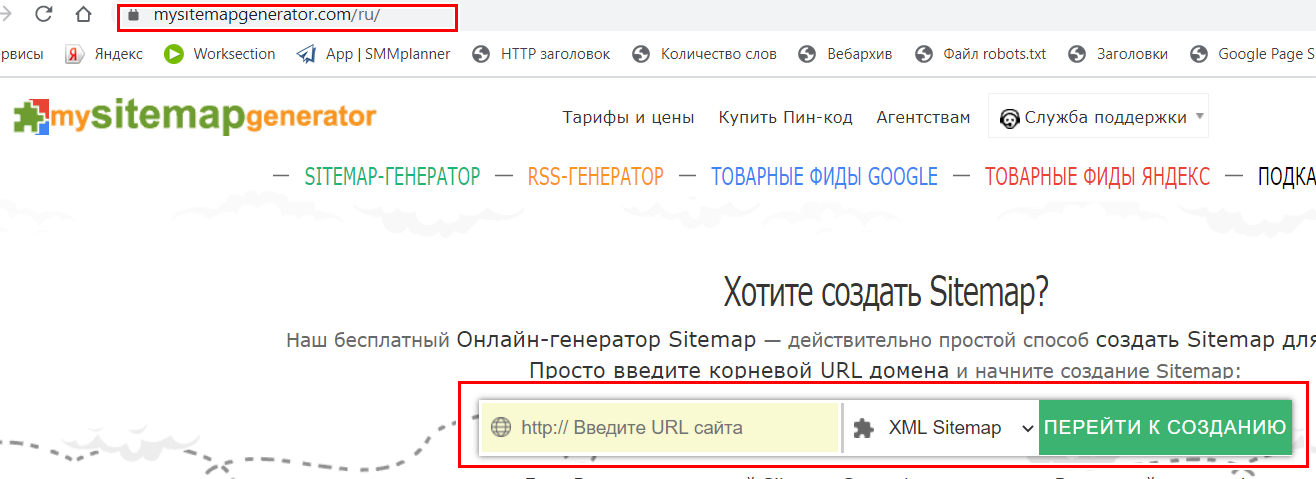
Why isn’t the Sitemap generator a one-size-fits-all solution?
There are two reasons for this:
- A limited number of entries that can be added. In other words, for a hundred items or fewer, this limitation won’t affect the result, and you’ll be able to create a sitemap using the generator without any problems. However, if you’re planning a sitemap with 500 or more items, MySiteMapGenerator won’t generate it for free — you’ll have to choose the paid version. And with every update, you’ll have to pay extra for the generation.
- The need for manual updates. If you need to frequently update your store’s product lineup, post articles to your blog, or publish news, this option won’t work for you, since every time you update, you’ll have to recreate the sitemap and then upload it to the server; otherwise, the new content won’t be indexed by search engine crawlers.
But overall, for sites with irregular or infrequent content updates and a small number of sections, creating a sitemap online is entirely feasible.
Composition rules
Let’s take a closer look at how to create a Sitemap for Google.
- It is generated with a link to the address xyz.net/Sitemap.xml (here xyz.net is replaced with your domain). If after generation it opens with a different address, it is enough to set up a redirect to this address from the previous URL.
- It looks like a document with a list of links and information about their update frequency, priority, and last update (directive). For data, the changefreq, and priority directives are used, respectively.

- Your sitemap must match the data in your robots.txt file. If you have blocked any URLs (containing service information, tags) from indexing in the “robots”, you should not indicate them in the sitemap.
- Do not include URLs with errors, test URLs, and other “garbage”.
- There are restrictions: less than 50,000 links, the final file size is less than 10 MB.
What to do if the Sitemap has more than 50 thousand positions?
Before creating a sitemap, check if the list of URLs contains test, unindexed pages, as well as links created by using filters and categories.
You can also break it into parts: create separate child Sitemaps for different types, and categories or break them down by other parameters.
Reduce the weight to the required 10 MB and collect all options with children together you can simply: archive them! The only condition: the archive extension must be .gz.
Generating a sitemap through popular CMS?
Today, your own CMS is almost a must-have for self-respecting online business owners. It’s good that almost every one of them has the ability to generate a sitemap in the CMS itself. We at Idea Digital Agency decided to consider the main three management systems and how to ensure construction with their help. Of course, we will talk about the most popular CMSs on our market: WordPress, OpenCart, and 1C Bitrix.
WordPress
To create a guide in the user-friendly WordPress environment, just a few simple steps are enough:
- You will need to install the WP Yoast SEO optimization plugin
- Don’t forget to activate it. Later, it will help you with other SEO settings.
- In the plugin menu, select XML-map and configure it: enter the maximum number of URLs (up to 50,000 positions, remember!), mark pages that should not be indexed, click Enabled — done!
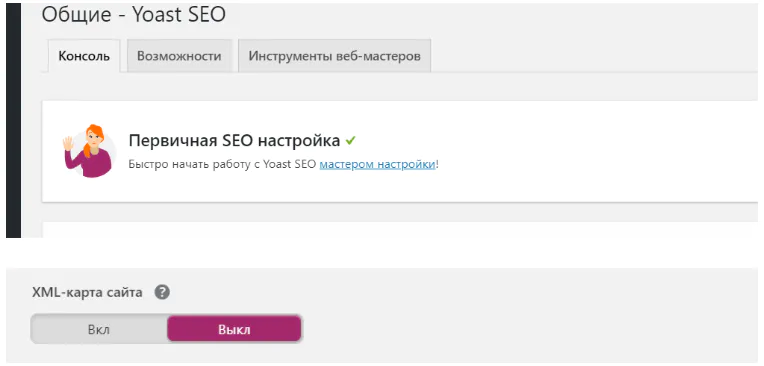
The WordPress plugin is convenient because it can generate a sitemap repeatedly and save all options, access to them is simple and logical. Also, if you look at the example of Sitemap xml in WordPress, it is convenient and understandable, both for webmasters and search engines. The only drawback is that it does not have built-in periodicity and priority parameters, so you will either have to give the programmers a task to “finish” the plugin, or update it manually each time.
OpenCart
To develop this tool in CMS OpenCart, we will need the Google Sitemap module. If you do not have it in the admin panel, install it, activate it, and switch it to “on” mode. In general, that’s all! Below in the window, you will see the finished URL, which can be inserted into robots.txt.
There is only one feature: the URL will look clearly different from the example we gave above. But this can be fixed with a simple 301 redirect.
How to Upload a Sitemap to Your Website
So, everything is ready—all that’s left is the final step: how do you add a sitemap to your website? But before you do that, don’t forget to check your Sitemap.xml. Checking the Sitemap.xml takes just a few minutes but helps you avoid errors later on.
Use specialized services to do this, such as XML Sitemaps. Just Google it, follow the link, upload the file, and run the check.
After that, add the sitemap link to the robots.txt file: search engines will find it there. Add the sitemap URL in Google Search Console
It’s also recommended to add the sitemap URL in Google Search Console and other webmaster tools.
Material on the topic: Google Search Console: how to add a site and SEO life hacks

Search Console also offers the option to run your own tests, and you shouldn’t skip this step: two checks are more accurate than one.
If you don’t know how to view your sitemap, you can find a link to it:
- in the robots.txt file,
- in your CMS settings,
- in your Google Services settings.
Creating a sitemap is straightforward, whether you want to use automated generators or build one manually through your CMS. Both options can be handled by inexperienced site owners, but turning to professionals is the best solution if you want to avoid mistakes and achieve tangible results.
The benefits of this guide are quite significant. Don’t overlook this useful tool, and your website will be displayed correctly in search engine results, while your pages will be indexed quickly and accurately with 24/7 content updates.Also be sure to read our article: A selection of tools for SEO analytics
Would you like to order comprehensive internet promotion or website development?
Fill out a simple form and we will contact you shortly.
FAQ
A sitemap.xml file is an XML file that contains a list of important pages on a website. It helps search engines find URLs faster and crawl the site’s structure more efficiently.
Creating a Sitemap.xml file is not a mandatory requirement for every website, but it is recommended as part of technical SEO optimization. It is especially useful for large websites, new resources, and websites that are updated frequently.
A sitemap is usually available at the standard address: https://website-domain/sitemap.xml. Its exact location depends on the website settings and CMS.
To add a Sitemap.xml file, open Google Search Console, select the relevant website, go to the «Sitemaps» section, enter the sitemap URL, and submit it for review.
Sitemap.xml is not a direct ranking factor. Its main purpose is to help search engines find and crawl website pages. Rankings are affected by content quality, technical optimization, and other SEO factors.
One Sitemap.xml file can contain up to 50,000 URLs and be up to 50 MB in size when uncompressed. Large websites use a Sitemap Index with multiple sitemap files.



Ready to discuss your project?
Leave a request and we will contact you.