Why Google Analytics and Search Console Data Don’t Match

Key Takeaways
- GA4 and Google Search Console measure different stages of the user journey — GSC records clicks from Google Search, while GA4 tracks sessions on your website.
- Clicks in Search Console and sessions in GA4 are not equivalent metrics; one click doesn’t always result in a session.
- Technical specifics of data collection impact discrepancies — ad blockers, consent settings, and incorrect GA4 implementation can reduce session counts.
- Differences in attribution and URL structures also explain data mismatches.
- To compare data correctly, use the same date ranges, segments, and URLs; the goal isn’t exact matching but understanding relationships.
- Sharp or unusual discrepancies may indicate analytics issues needing attention.
- Integrating GSC and GA4 data helps identify SEO growth opportunities, improve CTR and engagement without wasting resources.
When analyzing SEO traffic, you often encounter a situation where, for the same period, Google Search Console shows 5,000 clicks, but GA4 reports only 4,000 organic search sessions. At first glance, such a difference might seem like an analytics setup error, but in most cases, this discrepancy is quite natural.
GA4 and Google Search Console capture different stages of user interaction with a site and collect/process data differently, so their metrics should not be expected to match one-to-one.
In this article, we’ll examine the main causes of discrepancies, determine which GA4 and Search Console metrics can be meaningfully compared for building an effective SEO promotion strategy, and show how to use both data sources together to uncover growth points on existing pages and increase SEO traffic without creating new content.
GA4 and Google Search Console: What’s the Difference?
Google Search Console (GSC) is a tool that shows how users find your website in Google Search. GSC tracks metrics such as:
- Search queries your site appears for
- Number of impressions in search results
- Number of clicks on your site’s links from search results
- Average CTR (click-through rate)
- Average position of your site for queries
- Pages receiving the most organic search traffic
Essentially, GSC answers the question: «How and with which queries do users find my pages in Google?»
Google Analytics 4 (GA4) is a web analytics platform that tracks user behavior after they arrive on your site. It provides information on:
- Sessions (visits to the site)
- Unique users
- Engagement (time on site, pageviews)
- Events and conversions (sign-ups, purchases, clicks on key elements)
- Behavior on landing pages and subsequent actions
In other words, GA4 answers: «What happens to the user after they reach the website?»
Google Search Console | GA4 |
|---|---|
What happens in Google Search | What happens after the user lands on site |
Impressions | Sessions |
Clicks | Users |
CTR (click-through rate) | Engagement |
Average Position | Events and Conversions |
Search Queries | Landing Page Behavior |
Understanding this fundamental difference is critical for interpreting why Google Analytics and Search Console data diverge and why these tools should be used together rather than trying to reduce their stats to a single figure. For more on which tool is better for tracking site performance — GA4 or GSC — check out our blog.
Want to understand discrepancies between GA4 and Google Search Console and use these insights for meaningful SEO growth?
Submit your request — together, we’ll make your organic traffic more effective!
Why GA4 and Search Console Data Don’t Match
Discrepancies arise from multiple factors; there is no single reason. Let’s explore the main causes.
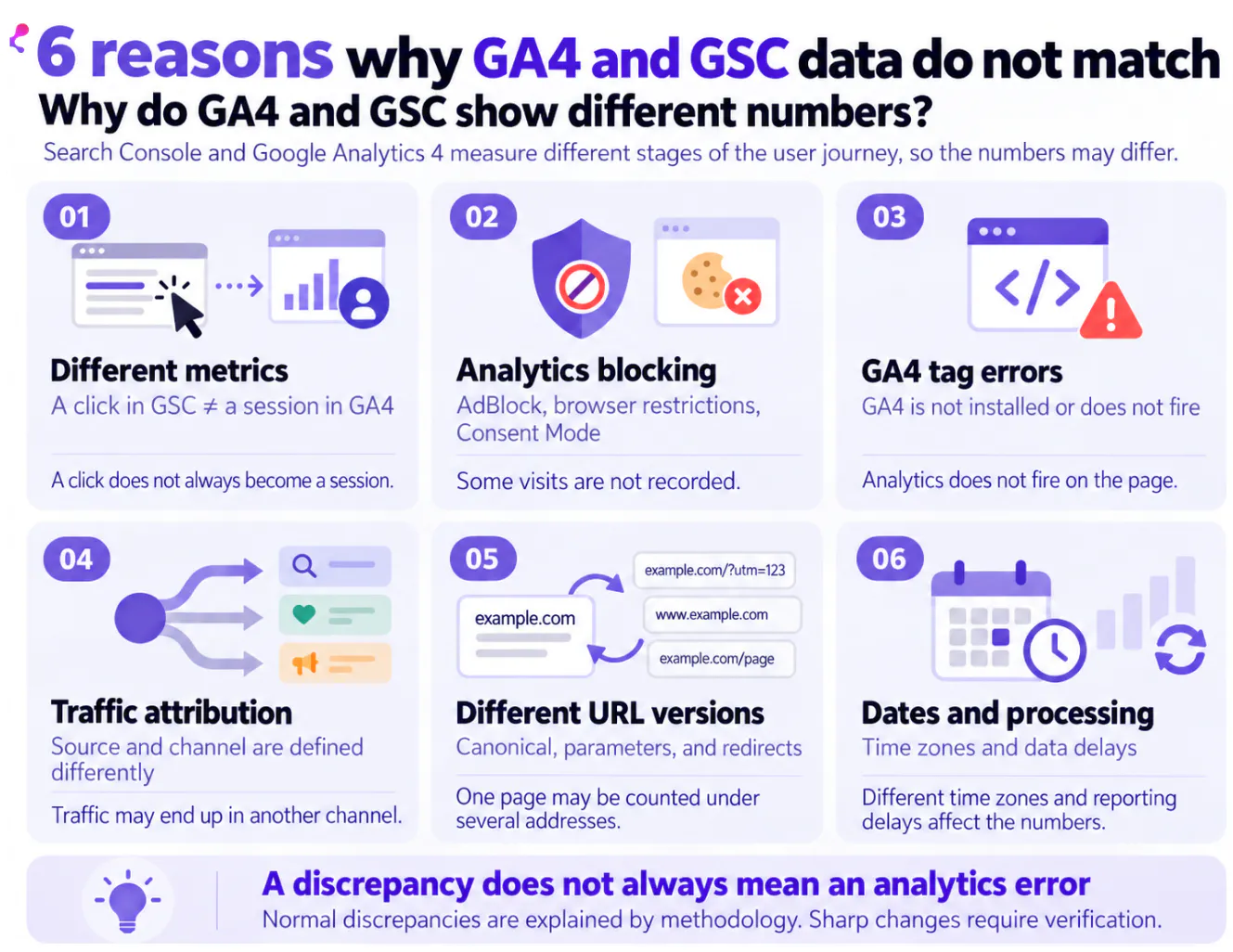
Clicks in Search Console vs Sessions in GA4 — Different Metrics
A common misconception is expecting exact equality between GSC clicks and GA4 sessions. However:
- A Click in GSC is the recorded action of a user clicking from Google Search results to your site.
- A Session in GA4 is a user session recorded by analytics, starting upon page load with the GA4 tag firing correctly.
In practice, it looks like this: a user clicks a link, but the page does not fully load (e.g., lost connection), or they close the tab before the analytics script executes, or a script error occurs. The click is recorded in GSC, but no session appears in GA4.
Conversely, one user may open the site multiple times within a short period — generating multiple GA4 sessions from a single GSC click.
GA4 Might Miss Some Visits
Google Search Console records clicks on the search results side, while GA4 collects data only after the user lands on your site and the analytics tag fires. Thus, a click may be logged in GSC but the corresponding session may not appear — or be tracked differently — in GA4.
Reasons include:
- Ad blockers and privacy extensions. Add-ons like AdBlock or Ghostery may block GA4 data collection or transmission.
- Browser settings. Restrictions on cookies, JavaScript, or tracking technologies impact analytics data gathering.
- GA4 setup errors. Tags missing from some pages, loading incorrectly, or blocked by misconfigurations in Tag Manager or site code.
- User consent settings. Consent Mode controls data collection based on user permissions and configuration.
- User left the page before tag loaded. Slow page or script loading may cause sessions not to register if the user exits early.
Hence, a Search Console click doesn’t guarantee a GA4 session. This is a key reason why GSC click counts can exceed GA4 organic sessions.
GA4 Tag Installation and Operation Errors
Another reason for discrepancies is the incorrect operation of the GA4 analytics tag. If it is not installed on certain pages or does not function properly, some organic visits will not be included in Google Analytics reports, even though clicks continue to be recorded in Search Console.
The most common technical issues:
- Missing tag on specific pages. For example, after updating the website template or adding new sections.
- Google Tag Manager configuration errors. Incorrect triggers or firing conditions can prevent data from being sent.
- Incorrect data stream ID. Events are being sent to the wrong GA4 property used for analysis.
- Duplicate tag installation. This can cause event duplication and distort certain metrics.
What to check: Use Google Tag Assistant and DebugView in GA4 to ensure the tag is firing correctly on the intended pages and that events are being sent to the correct property.
If the number of clicks remains stable in GSC but the number of organic sessions drops sharply in GA4, verifying tag functionality should be one of the first steps.
Organic Traffic Attribution Differs
Differences in how GA4 classifies traffic sources and channels also impact data. Attribution depends on available referral data, URL parameters, redirects, and tracking setup.
Therefore, not every organic click recorded in GSC matches GA4’s organic channel as expected in a direct comparison.
For best comparability, filter GA4 data by Session source = google and Session medium = organic, and use the same date range as in Search Console.
Even then, one-to-one comparison of clicks and sessions remains methodologically inaccurate. Filtering excludes irrelevant traffic sources but cannot fully eliminate other causes of discrepancy.
URLs Are Handled Differently in Each System
Page-level analysis mismatch can stem from how different versions of a single URL are counted.
GSC often groups data under the canonical URL, whereas GA4 records the exact landing page URL the user visited.
For example, a single page might be accessible via:
- /catalog/
- /catalog/?utm_source=…
- /catalog/?sort=price
Redirects and technical URL variants (HTTP vs HTTPS, www vs non-www, trailing slash vs no trailing slash) further influence data matching.
Practical advice: Before page-level comparison, verify canonical tags and redirects, and normalize URLs. If GA4 shows multiple URL variants for one page, sum them for accurate comparison. Otherwise, you risk underestimating organic traffic versus GSC.
Dates, Time Zones, and Data Processing Differences
Even with identical date ranges, temporary discrepancies can occur due to how each platform processes and updates data.
GA4 processes events and refreshes reports progressively; Search Console processes search data separately and updates metrics with its own delay.
Therefore, avoid comparing data for the current day or very recent periods because one system might have incomplete info.
Timezone settings also matter: GA4’s timezone (set in property settings) defines report day boundaries, which may differ from Search Console’s system timezone, especially noticeable when analyzing data over short periods.
To compare correctly:
- Use the same date range in GA4 and GSC.
- Analyze only completed, past days — not the current day.
- Consider GA4 timezone settings when doing daily comparisons.
- Allow a buffer so both systems fully process data.
How to Correctly Compare GA4 and Search Console Data
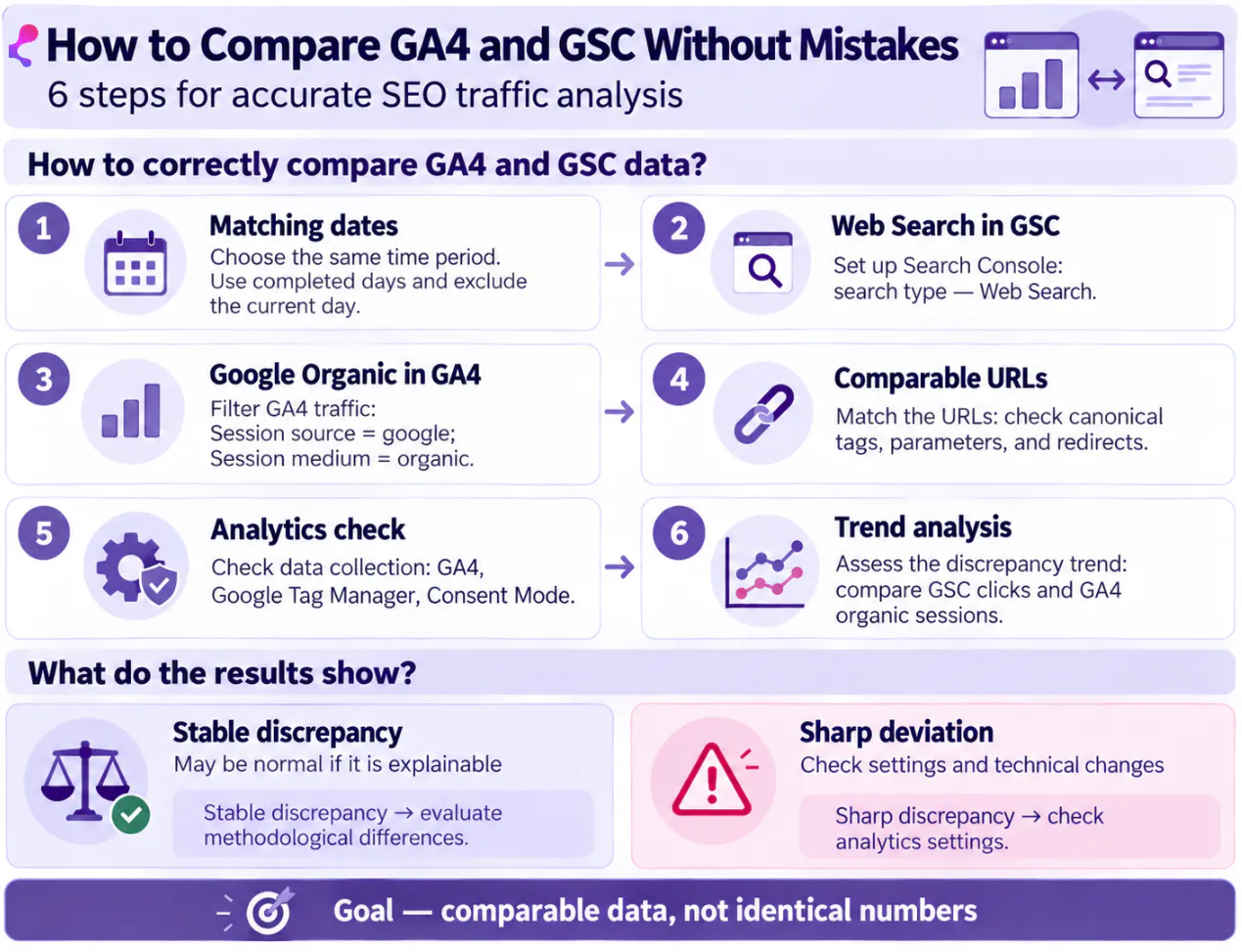
To draw valid conclusions and analyze SEO effectiveness, follow this checklist.
What to Check Before Comparing
- Use the same date range, preferably a completed period (exclude last 1-2 days).
- Exclude recent incomplete days.
- In GSC, select «Web Search» (exclude Video/Image Search).
- In GA4, filter for Google Organic traffic only, configured in channel grouping.
- Compare identical landing pages, accounting for canonical tags and URL normalization.
- Verify GA4 tags are properly implemented on pages.
- Confirm there are no technical failures or errors.
The goal is not identical numbers but comparable datasets for decision-making.
Which Metrics from GA4 and GSC to Analyze Together
Think of GSC and GA4 metrics as stages of a single funnel:
Google Search Console (search stage):
- Impressions — how often site pages appeared in search results
- Clicks — how many users clicked through to the site
- CTR — the ratio of clicks to impressions
- Average position — typical ranking of pages for queries
- Search queries — which phrases lead users to pages
Google Analytics 4 (post-click behavior):
- Sessions and users — volume of organic visits
- Engagement metrics — time on site, pageviews
- Events and conversions — key business actions taken
Use these datasets together rather than trying to match them exactly. For instance, high impressions but low CTR suggests potential to optimize search snippets. Steady clicks with low engagement or conversions signals the need to analyze onsite content and user experience.
Should You Aim for Matching GA4 and Search Console Data?
No, achieving perfect alignment is neither feasible nor necessary. Minor differences are normal due to distinct metrics, data capture rules, and processing methods.
Differences between GSC clicks and GA4 organic sessions alone don’t signal errors.
Focus instead on unusual or sharp changes. For example, if GSC clicks and impressions remain stable but GA4 organic traffic suddenly drops dramatically, this could indicate tracking or classification problems.
In such cases, check:
- GA4 tags fire correctly on all relevant pages
- Google Tag Manager and Consent Mode settings
- GA4’s definition of Google organic traffic channels
- New redirects, canonical changes, or URL structure modifications
- Matching comparison periods and parameters
Base decisions on trends and nature of discrepancies. Stable, explainable differences require no action, but sudden deviations warrant investigation.
Conclusions
When GA4 and Google Search Console data don’t match, don’t force them into identical numbers. First, confirm you’re comparing the same periods, Google organic traffic only, and matching URLs, then evaluate if differences are explained by metric types and data collection methods.
Check analytics only if discrepancies are abrupt or abnormal.
For SEO, it’s more useful to see data as a funnel: impressions → clicks → visits → engagement → conversions. This approach helps identify where potential is leaking:
- Many impressions but few clicks — review ranking position, Titles, Descriptions, and intent fit
- Queries ranking between positions 5-15 — strengthen existing content and internal linking
- Good clicks and organic traffic but low engagement or conversions — analyze page content, UX, and next steps for users
Ultimately, combined GA4 and Search Console analysis should highlight specific pages and optimization points. Often improving already ranking URLs brings faster SEO traffic gains than creating new pages.
FAQ
Clicks and sessions measure different actions. Clicks record user’s exit from Google Search, sessions start when a page with GA4 loads. Some sessions may be missed due to ad blockers or interrupted page loads.
No, these are different tools with distinct methodologies. Use them together to analyze correlations, not to force matching figures.
Check analytics setup, eliminate technical issues, properly configure organic traffic segments, account for redirects, and exclude recent partial days from analysis.
Yes, use consistent timezone settings or compare only full, completed days.
Yes, GA4 supports integration with GSC, enabling reports on search queries and landing pages directly within GA4.


Ready to discuss your project?
Submit your request, and we'll get in touch with you.