How to Track Referrals from ChatGPT, Gemini, and Perplexity in GA4

Key Takeaways:
- Traffic from ChatGPT, Gemini, and Perplexity is becoming a significant traffic source that should be accounted for in analytics.
- GA4 highlights the AI Assistant channel to automatically identify some AI traffic but does not capture all traffic from neural network services.
- Tracking traffic by individual AI services is possible by analyzing the Session source metric in GA4 reports.
- Manual filter configuration and creating custom channel groups allow for more precise control and analysis of AI traffic.
- Analyzing landing pages receiving AI traffic helps identify successful content and develop a content strategy considering visibility in ChatGPT and other platforms.
- Evaluating the quality of AI traffic requires looking not just at session volume but also engagement, conversions, and revenue.
- Fully accurate identification of neural network traffic is complicated by technical limitations and browser data transmission specifics.
Traffic from ChatGPT, Gemini, and Perplexity represents a distinct source that is crucial to consider when evaluating your website’s performance. In GA4, you can identify how many users arrive from AI services, which pages they visit, and whether they complete inquiries, purchases, or other goal actions.
However, GA4’s standard reports are often insufficient for detailed analysis. It’s important to pinpoint specific AI sources, compare them against each other, and, if necessary, group them into a separate segment.
This data helps assess AI traffic effectiveness and identify pages with potential for further GEO-targeted promotion. Importantly, referrals from neural networks should be analyzed alongside organic search and other channels within a comprehensive SEO promotion strategy. Below, we explain how to do this in GA4 in practice.
How AI Traffic Is Displayed in Google Analytics 4
GA4 determines the source of a session by the data available during the user’s visit. If a user clicks a link within an AI service and the browser passes along a referrer, Google Analytics can identify where the session originated. For example, the source might appear as perplexity.ai for Perplexity or gemini.google.com for Gemini.
To interpret this data correctly in GA4, it is essential to distinguish among three parameters:
- Source — the exact source of the visit, e.g., perplexity.ai or gemini.google.com;
- Medium — the acquisition type, e.g., external referral is typically marked as referral;
- Channel — a broader grouping where GA4 categorizes traffic based on predefined rules such as Organic Search, Referral, Direct, AI Assistant, etc.
If GA4 successfully detects and recognizes the referrer, the session can be linked to a specific AI service. When the referrer is not passed, the initial source cannot be identified, and the visit might end up classified as Direct. Before the introduction of a separate AI traffic classification, referrals from AI services were often counted under Referral.
Therefore, AI traffic in GA4 can be analyzed on multiple levels: by specific source, by medium, or by channel group. To better understand why particular pages receive AI-driven traffic, we recommend reading our article on how AI search chooses sources.
What Is the AI Assistant Channel in GA4?
AI Assistant is a new GA4 channel introduced in May 2026. It automatically aggregates traffic from recognized AI assistants, including ChatGPT, Gemini, DeepSeek, Copilot, and Grok. When GA4 detects the corresponding referrer, the traffic is assigned medium = ai-assistant, and the session is categorized under the AI Assistant channel.
This allows you to analyze recognized AI assistant traffic separately from Referral and other channels. However, AI Assistant should not be interpreted as a measure of all AI-related traffic. According to Google Analytics’ official channel classification, traffic from Google AI Overviews and AI Mode is not included in AI Assistant and is instead attributed to Organic Search.
Moreover, this channel depends on GA4’s ability to detect the referrer. Thus, AI Assistant is best used for monitoring automatically classified traffic from AI assistants rather than representing the total volume of AI-related traffic.
How to View Traffic from ChatGPT, Gemini, and Other AI Services in GA4
For an initial estimate of traffic from AI assistants, you can use the standard GA4 report:
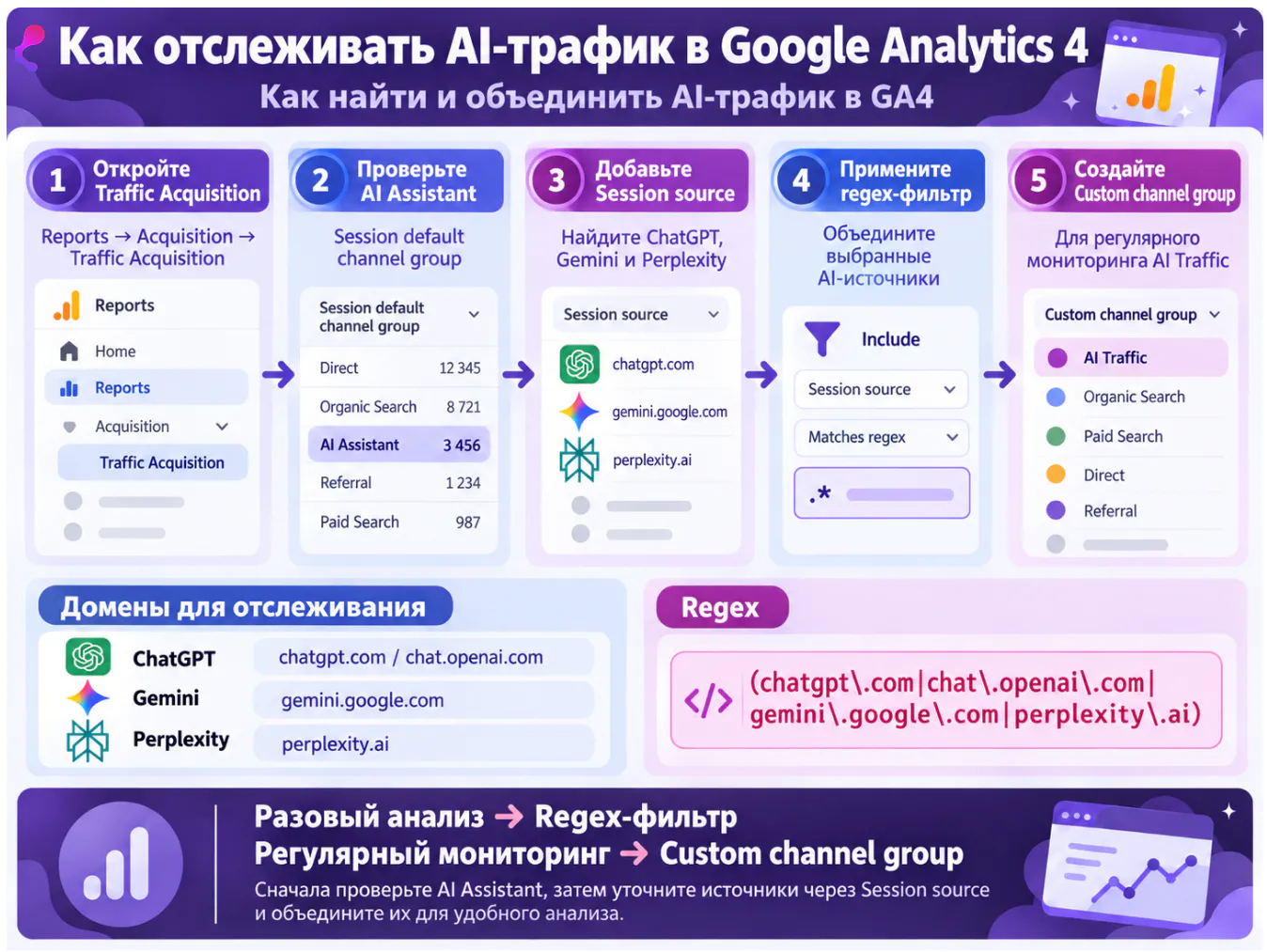
- Log into Google Analytics 4.
- Navigate to Reports → Acquisition → Traffic Acquisition.
- In the table, select Session default channel group.
- Look for the AI Assistant channel.
This report shows Sessions, Users, Engaged Sessions, Key Events, and Revenue (if eCommerce tracking is enabled). These metrics allow you to evaluate the volume and quality of recognized AI traffic and compare it to channels like Organic Search and Referral.
If you want to identify traffic specifically from ChatGPT, Gemini, or Perplexity, data must be broken down by session source.
How to View Referrals from ChatGPT, Gemini, and Perplexity Separately
To determine which AI service is driving users, use the Session source dimension:
- Open the Traffic Acquisition report.
- Add the Session source dimension as a secondary dimension.
- Locate or filter by the specific AI service sources:
- chatgpt.com or chat.openai.com — ChatGPT;
- gemini.google.com — Gemini;
- perplexity.ai — Perplexity.
- Compare metrics by source.
This analysis shows, for example, which service provides more sessions, which users are more engaged, and which AI platforms lead to more conversions. This granular view is more useful than the aggregated AI Assistant channel when wanting to compare individual AI sources.
How to Combine AI Sources into a Single GA4 Segment
If you want to analyze ChatGPT, Gemini, Perplexity, and other AI services as a combined group rather than individually, you can create a filter using a regular expression (regex).
Steps to do this:
- In the Traffic Acquisition report, click Add filter.
- Select Session source.
- Set the condition to Matches regex.
- Enter a regex listing the AI sources you want to include.
- Apply the filter.
The report will then display data for sources matching the regex, enabling you to evaluate total traffic and performance metrics without analyzing each AI service separately.
Regular Expression for ChatGPT, Gemini, and Perplexity
Use the following regex to combine these three main sources:
(chatgpt\.com|chat\.openai\.com|gemini\.google\.com|perplexity\.ai)
This will capture sessions where Session source matches any of the listed domains.
If needed, you may extend the list to include domains like Claude, Copilot, DeepSeek, Grok, and other AI platforms — only adding those relevant for your analysis. Avoid building excessively long lists of AI services unless necessary.
Regex filters are good for ad hoc or periodic analysis but do not create new channels or change GA4’s original traffic classification rules.
How to Create a Dedicated AI Traffic Channel
If you need to analyze the grouped AI sources regularly, creating a Custom channel group in GA4 is more convenient. This lets you define rules for desired sources and have a separate AI Traffic channel alongside Organic Search, Referral, Paid Search, etc.
In the channel group settings:
- Define rules based on Session source matching your regex for AI services.
- Order the rules so AI sources are classified in this channel before they fall into broader categories like Referral.
This results in a persistent classification that simplifies ongoing comparison of AI traffic versus other channels. For quick analysis, a regex filter suffices, but a Custom channel group becomes valuable once AI traffic is a permanent part of your reporting.
If channel analysis indicates not only low AI traffic but also organic visibility or search traffic issues, consider performing an SEO audit. It helps check technical factors limiting crawlability, indexing, and search visibility.
How to Identify Which Pages Receive Traffic from ChatGPT, Gemini, and Perplexity
The absolute number of referrals says little about the SEO value of AI traffic. It is crucial to know which pages users land on from ChatGPT, Gemini, and Perplexity. This reveals content and landing pages already visible in AI services.
To analyze this, add the Landing page dimension to the selected AI source segment — for example:
AI Source → Landing Page → Sessions
Example:
chatgpt.com → /blog/example/ → 35 sessions
perplexity.ai → /services/example/ → 12 sessions
This report quickly highlights pages attracting the most AI-driven traffic. Then, analyze those pages regarding content type, topic, structure, intent, and conversions. If several materials of the same format consistently receive AI traffic, this guides your content strategy.
Note that session tracking reflects clicks coming from AI services but does not confirm that the neural network always «quotes» the page — GA4 registers the click itself, not the AI response context. Monitoring quotes and response frequency requires dedicated monitoring tools.
Pages already receiving AI traffic help identify promising topics for further content development. Based on them, you can explore related queries and intents, expand your site’s semantic core, and plan new materials on topics showing AI channel potential.
If you want not only to see how many visitors come from ChatGPT or Gemini, but also to get the tools you need to effectively analyze and optimize your website for AI traffic, Idea Digital Agency is here to help.
Leave a request — together we'll increase your visibility in the digital AI era.
Key AI Traffic Metrics to Analyze
Evaluating AI traffic solely by session count is misleading. A smaller source may bring more targeted audiences and greater business impact than a channel with much higher traffic volume.
In GA4, analyze these metrics together:
- Sessions — number of sessions from the AI source;
- Engagement rate — proportion of engaged sessions;
- Average engagement time — time users actively interact with the site;
- Key events — number of important business actions users perform;
- Revenue — income generated if eCommerce tracking is enabled.
For example, 100 sessions from ChatGPT can be more valuable than 1,000 sessions from another source if ChatGPT users convert more often. Thus, compare not only volume but also traffic quality and results.
There are two comparison levels: first, compare overall AI traffic with Organic Search and Referral to understand its role in acquisition; second, compare ChatGPT, Gemini, and Perplexity individually as their audiences may differ in intent, engagement, and conversion.
Why GA4 Does Not Show All Traffic from ChatGPT and Other Neural Networks
GA4 can only associate a session with a specific AI service if enough source information is available. If the browser passes the referrer and GA4 recognizes it, the source is identified. If this data is missing, tracing session origin from standard analytics becomes difficult.
This often happens when users copy a URL from an AI-generated answer and open it separately, or in other cases where referrer data is missing. Consequently, some actual AI-driven referrals may be classified differently, for example, as Direct traffic.
Therefore, the numbers in AI Assistant, custom AI Traffic, or Session source reports should be seen as the measurable portion of AI traffic, not the guaranteed full volume of users who discovered your site via neural networks.
Can AI Traffic Be Identified Within Direct Traffic?
If GA4 receives a session without source data, it is not possible to reliably prove the user came from ChatGPT, Gemini, or Perplexity. Attributing suspicious Direct traffic growth entirely to AI traffic would be erroneous.
You can look for possible patterns by comparing changes in Direct traffic, landing pages, new users, and periods of site visibility growth in AI services. For example, an unusual spike in Direct traffic to a particular article coinciding with its increased appearance in AI answers might be an indicator for further investigation.
However, this remains circumstantial. Reporting should distinguish between measured AI traffic that GA4 has identified and presumed AI traffic inferred indirectly.
How Referrals from ChatGPT and Gemini Differ from Google AI Overviews
From a user perspective, ChatGPT, Gemini, Perplexity, AI Overviews, and AI Mode all belong to AI search, but GA4 may treat them as different sources and channels.
Traffic from recognized AI assistants tends to be categorized under AI Assistant. In contrast, traffic from Google AI Overviews and AI Mode is attributed to Organic Search. Therefore, growth in traffic from Google AI features is counted within organic search traffic and may not appear in AI Assistant.
Because of this, AI Assistant should not be treated as equivalent to all AI search traffic. This distinction is critical for SEO: assessing AI’s impact on search visibility must consider organic search data and the broader SEO strategy.
What Tracking AI Traffic Brings to SEO
GA4 data allows you to move from assumptions about your site’s presence in AI services to tangible results: identify which pages receive referrals, which platforms bring users, how engaged those users are, and whether they complete target actions.
With regular analysis, you can track AI channel trends and benchmark against Organic Search and other sources.
SEO benefits particularly from analyzing pages consistently attracting ChatGPT, Gemini, or Perplexity traffic. You can compare their topics, formats, structure, and search intent to find patterns useful for refreshing existing and creating new content. The next step is SEO and AI content optimization, focusing not only on traditional organic search but also on AI content visibility.
For monitoring, combine several analysis levels: AI Assistant for quick overview of auto-classified traffic, Session source to measure individual services’ contributions, and regex filters or Custom channel groups to aggregate desired AI sources. Together, these methods provide a more comprehensive picture than any single tool.
If you want not just to monitor AI service referrals but also to boost your site’s visibility in ChatGPT, Gemini, Perplexity, and classic search, Idea Digital Agency’s team can help assess your current visibility, find growth opportunities, and build SEO and GEO strategies tailored to your business goals.
FAQ
Go to Reports → Acquisition → Traffic Acquisition and check the AI Assistant channel. For ChatGPT-specific analysis, use Session source and look for chatgpt.com and chat.openai.com.
Yes. Use the Session source dimension to analyze gemini.google.com for Gemini and perplexity.ai for Perplexity. To compare multiple AI services, combine them using a regex filter.
GA4 can only detect the source if proper referrer data is available. If the referrer is missing (e.g., when a user copies a URL from an AI response and opens it separately), GA4 cannot reliably associate the session with ChatGPT; such visits may appear as Direct traffic.
No. Google assigns traffic from AI Overviews and AI Mode to Organic Search, so this does not appear as part of AI Assistant. This distinction is important when assessing AI search’s overall impact.
Beyond sessions, analyze Engagement rate, Average engagement time, Key events, and Revenue. This helps assess not just AI traffic volume but also its quality — how actively users interact and whether these visits lead to conversions or revenue.


Ready to discuss your project?
Submit your request, and we'll get in touch with you.